

Run HR without
the spreadsheets.
Humrivo keeps attendance, leave, payroll and employee records in one system, so the numbers your payroll run uses are the same ones your team clocked.
- Multi-tenant isolation
- Per-module role permissions
- Server-side payroll rules
- 6
- module areas
- 3
- role-based panels
- 1
- employee record
People to insights
Employee, admin, owner
Shared by every module
- Attendance
- Leave
- Payroll
- Employee records
- Contracts
- Org chart
- Recruitment
- Performance
- Training
- Assets
- Travel
- Expenses
- Tasks
- Analytics
- Client billing
Six module areas. One set of records.
Every module reads and writes the same employee record — so nothing here needs exporting into anything else here.
Hours that payroll can trust
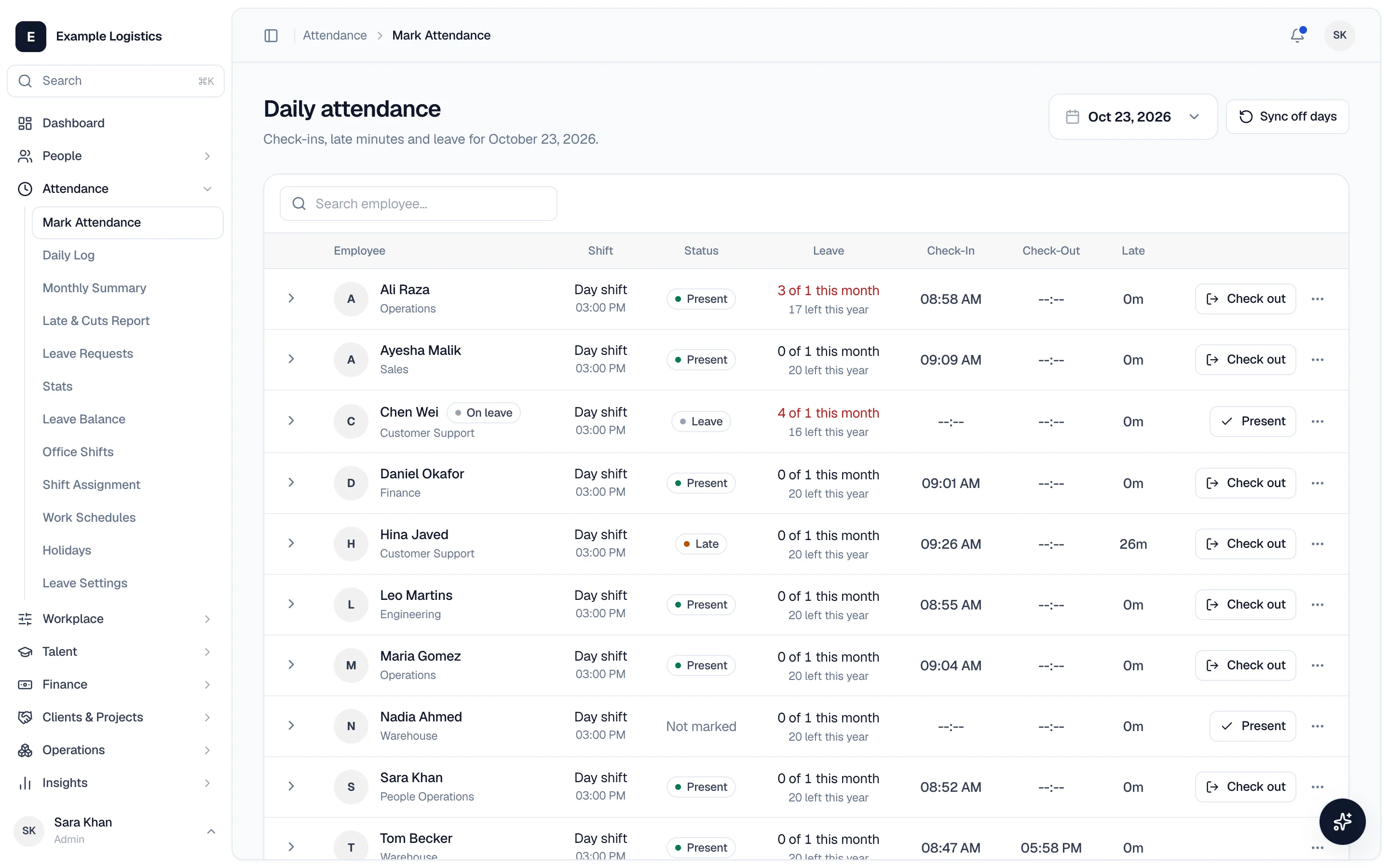
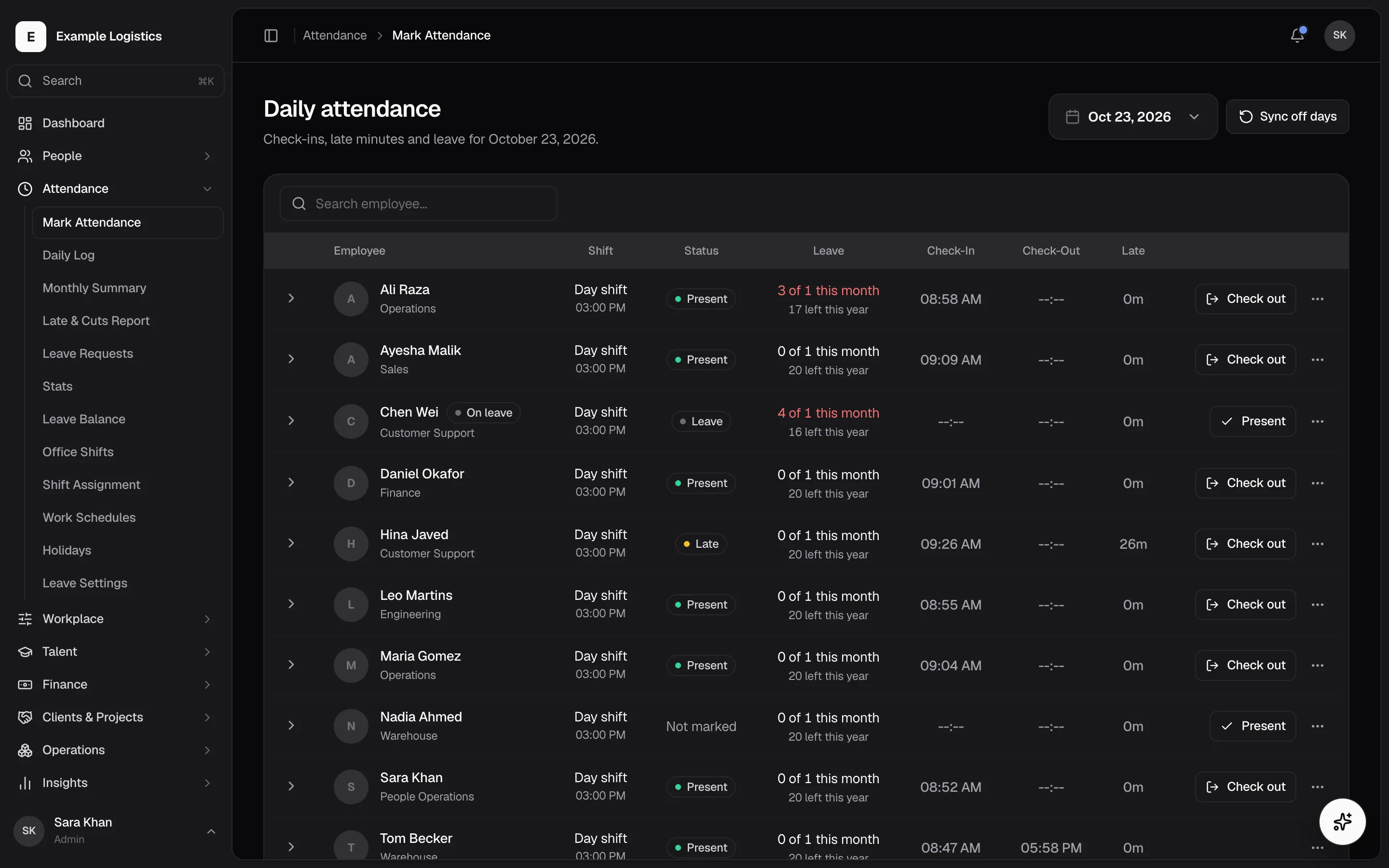
Clock-ins, shifts, holidays and leave balances are calculated server-side and feed payroll directly. No exporting, no re-keying.
- Clock in and out
- Shifts & schedules
- Leave & time off
- Corrections with a trail
Payroll that reads your attendance data
Define the rules once and run them against verified hours. Payslips, incentives, expenses and reimbursements stay in the same ledger.
- Payroll rules
- Payroll register & history
- Payslips
- Incentives & expenses
One record per employee, and one place to change it
Profiles, contracts, reporting lines and org structure live together. Update someone once and every module that reads them follows.
- Employee profiles
- Contracts & documents
- Org chart
- Departments, teams & branches
Reporting line
- MVMarcus VanceEngineering
- PRPriya RamanDesign
- TOTom OkaforOperations
Hiring, onboarding and reviews in the same system as the record
A new hire becomes an employee profile without a hand-off. Reviews and training reference that same profile.
- Recruitment
- Onboarding
- Performance
- Training
Open role · Product designer
Applied
8
Interview
3
Offer
1
The things employees hold, book and ask for
Assets, travel, tasks and internal support tickets — the operational long tail that otherwise lives in email.
- Asset allocation
- Travel management
- Tasks & meetings
- Internal support & chat
Desk & travel
- MacBook Pro 14"Marcus VanceAssigned
- Dubai · 3 nightsPriya RamanPending
Reporting on the data you already entered
Dedicated analytics for each domain, reading live records rather than a nightly export.
- Attendance & leave analytics
- Payroll analytics
- Recruitment & performance analytics
- Client & project analytics
Everyone sees the view their role needs
The same platform presents differently depending on who signed in. Employees never see administration; admins never see another company.
Self-service that removes the asking
Clock in, check a leave balance, request time off, download a payslip, see assigned tasks and assets. Most HR questions answer themselves.
- Clock in & out
- Leave requests
- Payslips
- My assets
The controls HR actually uses daily
Approve leave, adjust attendance, run payroll, manage contracts and configure the policies your company runs on — scoped to your company only.
- Approvals
- Payroll runs
- Policy configuration
- Role permissions
Run it as a SaaS business
For operators running Humrivo for multiple companies: tenant directory, subscription state and platform-wide configuration above the individual company.
- Tenant directory
- Subscription state
- Platform branding
- Marketing SEO
From a clock-in to a payslip, without a re-entry.
This is the sequence the product exists to close. Every step writes to the record the next step reads.
- 01
Employees clock in
From the web portal or the desktop agent. The record is written against their shift and schedule.
09:00 → 17:24 - 02
Managers approve
Leave requests, expense claims and attendance corrections route to the right approver by reporting line.
Approved · 2 days - 03
Rules evaluate
Your payroll rules run server-side against verified hours, applying overtime, allowances and deductions.
+62h overtime - 04
Payslips publish
The run is reviewed, committed and published to each employee portal. The history stays queryable.
38,675.00
Billing clients, not just paying staff
If you bill your people out, Humrivo carries the other half of the ledger: clients, projects, invoices and per-project profitability, using the same time data payroll runs on.
- Client directory with per-client project lists
- Projects that draw on tracked employee time
- Invoices generated from that time
- Analytics comparing what a project cost against what it billed
Projects
Q3 · 2026Atlas rebrand
Northwind · 164h
Q3 platform work
Kestrel Co · 312h
Retainer
Beacon Labs · 80h
Built multi-tenant from the first table
Isolation is not a setting we added later. It is enforced in the database rules every request passes through.
- Tenant isolation enforced at the database
- Every company-scoped collection is guarded by Firestore security rules that check the caller against the tenant on the document. The rules are the boundary — not the interface.
- Permissions per module, not per person
- Access is granted against module keys — people, attendance, finance, talent, workplace, operations, insights, system — so a payroll clerk never sees recruitment.
- Payroll computed server-side
- Rule evaluation does not run in the browser, so a client cannot alter what a period is worth.
- Employees are the default role
- A new account gets employee access only. Administrative capability is granted deliberately, never inherited by accident.
The same system, shaped by how you operate
The problem
Time sits in one spreadsheet, client billing in another, and nobody is sure which is current.
How Humrivo handles it
Tracked time feeds both payroll and project invoicing from the same records, with onboarding checklists for people joining fast.
What changes
One number for hours worked, used by both the payroll run and the client invoice.
Priced by team size, not by seat anxiety
Every plan includes multi-tenant isolation and per-module permissions. The tiers differ in which modules are switched on.
Starter
$49/month
For small teams replacing a folder of spreadsheets with a system of record.
- Up to 25 active employees
- Employee profiles & org chart
- Contracts & document storage
- Leave types, balances & approvals
- Role-based module permissions
Growth
Most chosen$99/month
For companies running shifts, where attendance has to reach payroll accurately.
- Up to 100 active employees
- Everything in Starter
- Clock in/out with break tracking
- Shift templates & schedules
- Multi-level leave approvals
Platform
$249/month
For payroll automation, client billing, and operators running multiple companies.
- Unlimited employees
- Everything in Growth
- Formula-based payroll rules
- Payslip generation & history
- Client, project & invoice modules
Questions worth a straight answer
How is one company kept separate from another?
Every company-scoped record carries its tenant, and Firestore security rules check the caller against that tenant before any read or write. The enforcement is in the database rules rather than the interface, so it holds regardless of what the client sends.
Can I define our own payroll calculation?
Yes. The payroll rules module lets admins express base pay, overtime, allowances and deductions as formulas. Those rules are evaluated server-side against verified attendance, so the same inputs always produce the same result.
What exactly does the desktop agent monitor?
Today it registers a device against an employee, maintains a heartbeat while running, and displays the monitoring policy your company has configured. It does not take screenshots, record keystrokes, poll which applications are open, or track browser URLs, and it installs no autorun service.
Can we control who sees payroll or recruitment?
Access is granted per module — people, attendance, finance, talent, workplace, operations, insights and system are separate keys. Someone who administers attendance does not get payroll unless you grant it, and employees hold no administrative access by default.
Can we bring our existing employee list across?
Yes. Employee records support bulk import from CSV, so you can map your existing columns to departments, designations and contact fields rather than retyping them.
Do you handle teams across multiple time zones?
Attendance is calculated with the employee timezone in mind rather than a single office timezone, and holidays and working schedules are configured per branch.
Move your HR off spreadsheets this month.
Create a workspace, import your team, and run one payroll period against real attendance data.
No card required · 14-day Growth trial